在当今的软件开发领域中,构建跨平台应用程序已经成为了一个普遍存在的需求。不同的操作系统、硬件架构需要不同的镜像环境来支持它们。Docker 作为一个广泛应用的容器化技术,必然需要能够支持构建跨平台镜像,本文将介绍如何使用 docker manifest 来实现构建跨平台镜像。

简介

docker manifest 是 Docker 的一个命令,它提供了一种方便的方式来管理不同操作系统和硬件架构的 Docker 镜像。通过 docker manifest,用户可以创建一个虚拟的 Docker 镜像,其中包含了多个实际的 Docker 镜像,每个实际的 Docker 镜像对应一个不同的操作系统和硬件架构。

docker manifest 命令本身并不执行任何操作。为了操作一个 manifest 或 manifest list,必须使用其中一个子命令。

manifest 可以理解为是一个 JSON 文件,单个 manifest 包含有关镜像的信息,例如层(layers)、大小(size)和摘要(digest)等。

manifest list 是通过指定一个或多个(理想情况下是多个)镜像名称创建的镜像列表(即上面所说的虚拟 Docker 镜像)。可以像普通镜像一样使用 docker pull 和 docker run 等命令来操作它。manifest list 通常被称为「多架构镜像」。

注意:docker manifest 命令是实验性的,还未转正。旨在用于测试和反馈,因此其功能和用法可能会在不同版本之间发生变化。

准备工作

工欲善其事,必先利其器,如果想使用 docker manifest 构建多架构镜像,需要具备以下条件。

  • 机器上安装了 Docker。

  • 需要注册一个 Docker Hub 账号。

  • 最少有两个不同平台的主机,用来验证 docker manifest 锁构建出来的多架构镜像正确性(可选)。

  • 联网,docker manifest 命令是需要联网使用的。

为不同平台构建镜像

本文中演示程序所使用的环境是 Apple M2 芯片平台。本地的 Docker 版本如下:

1
2
3
4
5
6
7
8
9
10
11
12
13
14
15
16
17
18
19
20
21
22
23
24
25
26
27
28
29
30
$ docker version
Client:
Cloud integration: v1.0.29
Version: 20.10.21
API version: 1.41
Go version: go1.18.7
Git commit: baeda1f
Built: Tue Oct 25 18:01:18 2022
OS/Arch: darwin/arm64
Context: default
Experimental: true

Server: Docker Desktop 4.15.0 (93002)
Engine:
Version: 20.10.21
API version: 1.41 (minimum version 1.12)
Go version: go1.18.7
Git commit: 3056208
Built: Tue Oct 25 17:59:41 2022
OS/Arch: linux/arm64
Experimental: false
containerd:
Version: 1.6.10
GitCommit: 770bd0108c32f3fb5c73ae1264f7e503fe7b2661
runc:
Version: 1.1.4
GitCommit: v1.1.4-0-g5fd4c4d
docker-init:
Version: 0.19.0
GitCommit: de40ad0

准备 Dockerfile

首先准备如下 Dockerfile 文件,用来构建镜像。

1
2
3
4
5
FROM alpine

RUN uname -a > /os.txt

CMD cat /os.txt

这个镜像非常简单,构建时将 uname -a 命令输出信息(即当前操作系统的相关信息)写入 /os.txt,运行时将 /os.txt 内容输出。

构建 arm64 平台镜像

因为本机为 Apple M2 芯片,所以使用 docker build 命令构建镜像默认为 arm64 平台镜像。构建命令如下:

1
2
3
4
5
6
7
8
9
10
11
12
13
14
15
$ docker build -t jianghushinian/echo-platform-arm64 .
[+] Building 15.6s (6/6) FINISHED
=> [internal] load build definition from Dockerfile 0.0s
=> => transferring dockerfile: 94B 0.0s
=> [internal] load .dockerignore 0.0s
=> => transferring context: 2B 0.0s
=> [internal] load metadata for docker.io/library/alpine:latest 15.5s
=> [1/2] FROM docker.io/library/alpine@sha256:21a3deaa0d32a8057914f36584b5288d2e5ecc984380bc01 0.0s
=> CACHED [2/2] RUN uname -a > /os.txt 0.0s
=> exporting to image 0.0s
=> => exporting layers 0.0s
=> => writing image sha256:f017783a39920aa4646f87d7e5a2d67ab51aab479147d60e5372f8749c3742bb 0.0s
=> => naming to docker.io/jianghushinian/echo-platform-arm64 0.0s

Use 'docker scan' to run Snyk tests against images to find vulnerabilities and learn how to fix them

注意:jianghushinian 是我的 Docker Hub 用户名,你在构建镜像时应该使用自己的 Docker Hub 用户名。

如果得到如上类似输出,表明构建成功。

使用 docker run 运行容器进行测试:

1
2
$ docker run --rm jianghushinian/echo-platform-arm64
Linux buildkitsandbox 5.15.49-linuxkit #1 SMP PREEMPT Tue Sep 13 07:51:32 UTC 2022 aarch64 Linux

输出内容中的 aarch64 就表示 ARMv8 架构。

现在我们需要将镜像推送到 Docker Hub,确保在命令行中已经使用 docker login 登录过 Docker Hub 的情况下,使用 docker push 命令推送镜像:

1
2
3
4
5
6
$ docker push jianghushinian/echo-platform-arm64
Using default tag: latest
The push refers to repository [docker.io/jianghushinian/echo-platform-arm64]
dd0468cb6cb1: Pushed
07d3c46c9599: Mounted from jianghushinian/demo-arm64
latest: digest: sha256:8eb172234961bf54a01e83d510697f09646c43c297a24f839be846414dfaf583 size: 735

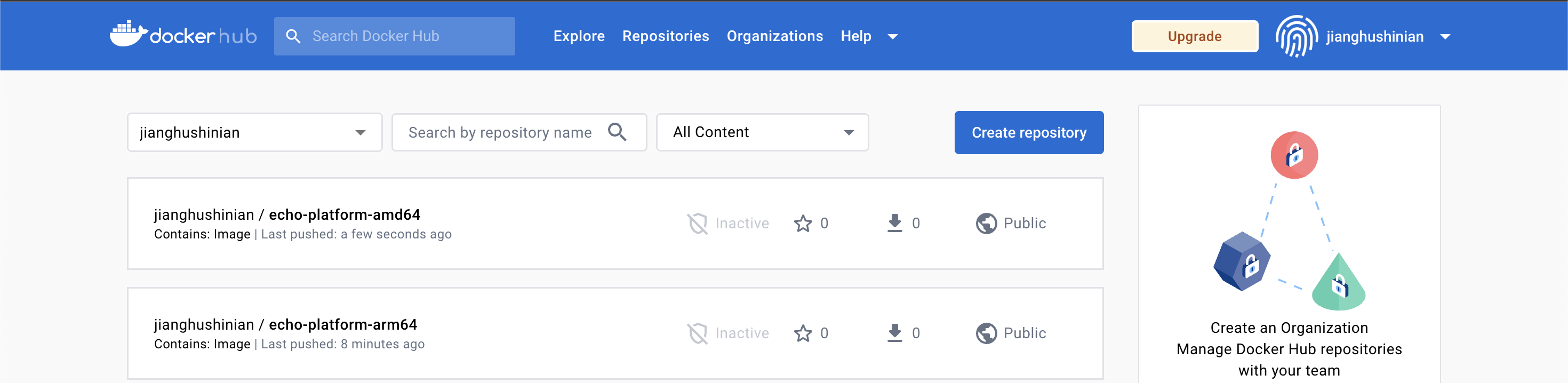
浏览器中登录 Docker Hub 查看推送成功的镜像:

echo-platform-arm64
echo-platform-arm64

构建 amd64 平台镜像

无需切换设备,在 Apple M2 芯片的机器上我们可以直接构建 amd64 也就是 Linux 平台镜像,docker build 命令提供了 --platform 参数可以构建跨平台镜像。

1
2
3
4
5
6
7
8
9
10
11
12
13
14
15
$ docker build --platform=linux/amd64 -t jianghushinian/echo-platform-amd64 .
[+] Building 15.7s (6/6) FINISHED
=> [internal] load build definition from Dockerfile 0.0s
=> => transferring dockerfile: 36B 0.0s
=> [internal] load .dockerignore 0.0s
=> => transferring context: 2B 0.0s
=> [internal] load metadata for docker.io/library/alpine:latest 15.3s
=> CACHED [1/2] FROM docker.io/library/alpine@sha256:21a3deaa0d32a8057914f36584b5288d2e5ecc984380bc0118285c70fa8c9300 0.0s
=> [2/2] RUN uname -a > /os.txt 0.2s
=> exporting to image 0.0s
=> => exporting layers 0.0s
=> => writing image sha256:5c48af5176402727627cc18136d78f87f0793ccf61e3e3fb4df98391a69e9f70 0.0s
=> => naming to docker.io/jianghushinian/echo-platform-amd64 0.0s

Use 'docker scan' to run Snyk tests against images to find vulnerabilities and learn how to fix them

镜像构建成功后,同样使用 docker push 命令推送镜像到 Docker Hub:

1
2
3
4
5
6
$ docker push jianghushinian/echo-platform-amd64
Using default tag: latest
The push refers to repository [docker.io/jianghushinian/echo-platform-amd64]
9499dee27c9f: Pushed
8d3ac3489996: Mounted from jianghushinian/demo-amd64
latest: digest: sha256:13cbf21fc8078fb54444992faae9aafca0706a842dfb0ab4f3447a6f14fb1359 size: 735

浏览器中登录 Docker Hub 查看推送成功的镜像:

echo-platform-amd64
echo-platform-amd64

你也许会好奇,在 Apple M2 芯片的主机设备上运行 amd64 平台镜像会怎样。目前咱们构建的这个简单镜像其实是能够运行的,只不过会得到一条警告信息:

1
2
3
$ docker run --rm jianghushinian/echo-platform-amd64
WARNING: The requested image's platform (linux/amd64) does not match the detected host platform (linux/arm64/v8) and no specific platform was requested
Linux buildkitsandbox 5.15.49-linuxkit #1 SMP PREEMPT Tue Sep 13 07:51:32 UTC 2022 x86_64 Linux

输出内容中的 x86_64 就表示 AMD64 架构。

注意:虽然这个简单的镜像能够运行成功,但如果容器内部程序不支持跨平台,amd64 平台镜像无法在 arm64 平台运行成功。

同样的,如果我们登录到一台 amd64 架构的设备上运行 arm64 平台镜像,也会得到一条警告信息:

1
2
3
# docker run --rm jianghushinian/echo-platform-arm64
WARNING: The requested image's platform (linux/arm64/v8) does not match the detected host platform (linux/amd64) and no specific platform was requested
Linux buildkitsandbox 5.15.49-linuxkit #1 SMP PREEMPT Tue Sep 13 07:51:32 UTC 2022 aarch64 Linux

在 amd64 架构的设备上运行 amd64 平台镜像则不会遇到警告问题:

1
2
# docker run --rm jianghushinian/echo-platform-amd64
Linux buildkitsandbox 5.15.49-linuxkit #1 SMP PREEMPT Tue Sep 13 07:51:32 UTC 2022 x86_64 Linux

使用 manifest 合并多平台镜像

我们可以使用 docker manifest 的子命令 create 创建一个 manifest list,即将多个平台的镜像合并为一个镜像。

create 命令用法很简单,后面跟的第一个参数 jianghushinian/echo-platform 即为合并后的镜像,从第二个参数开始可以指定一个或多个不同平台的镜像。

1
2
$ docker manifest create jianghushinian/echo-platform jianghushinian/echo-platform-arm64 jianghushinian/echo-platform-amd64
Created manifest list docker.io/jianghushinian/echo-platform:latest

如上输出,表明多架构镜像构建成功。

注意:在使用 docker manifest create 命令时,确保待合并镜像都已经被推送到 Docker Hub 镜像仓库,不然报错 no such manifest。这也是为什么前文在构建镜像时,都会将镜像推送到 Docker Hub。

此时在 Apple M2 芯片设备上使用 docker run 启动构建好的跨平台镜像 jianghushinian/echo-platform:

1
2
$ docker run --rm jianghushinian/echo-platform
Linux buildkitsandbox 5.4.0-80-generic #90-Ubuntu SMP Fri Jul 9 22:49:44 UTC 2021 aarch64 Linux

没有任何问题,就像在启动 jianghushinian/echo-platform-arm64 镜像一样。

现在我们可以将这个跨平台镜像推送到 Docker Hub,不过,这回我们需要使用的命令不再是 docker push 而是 manifest 的子命令 docker manifest push:

1
2
3
4
$ docker manifest push jianghushinian/echo-platform
Pushed ref docker.io/jianghushinian/echo-platform@sha256:13cbf21fc8078fb54444992faae9aafca0706a842dfb0ab4f3447a6f14fb1359 with digest: sha256:13cbf21fc8078fb54444992faae9aafca0706a842dfb0ab4f3447a6f14fb1359
Pushed ref docker.io/jianghushinian/echo-platform@sha256:8eb172234961bf54a01e83d510697f09646c43c297a24f839be846414dfaf583 with digest: sha256:8eb172234961bf54a01e83d510697f09646c43c297a24f839be846414dfaf583
sha256:87b51c1835f13bb722bbb4279fcf50a6da0ecb852433a8f1c04e2f5fe93ac055

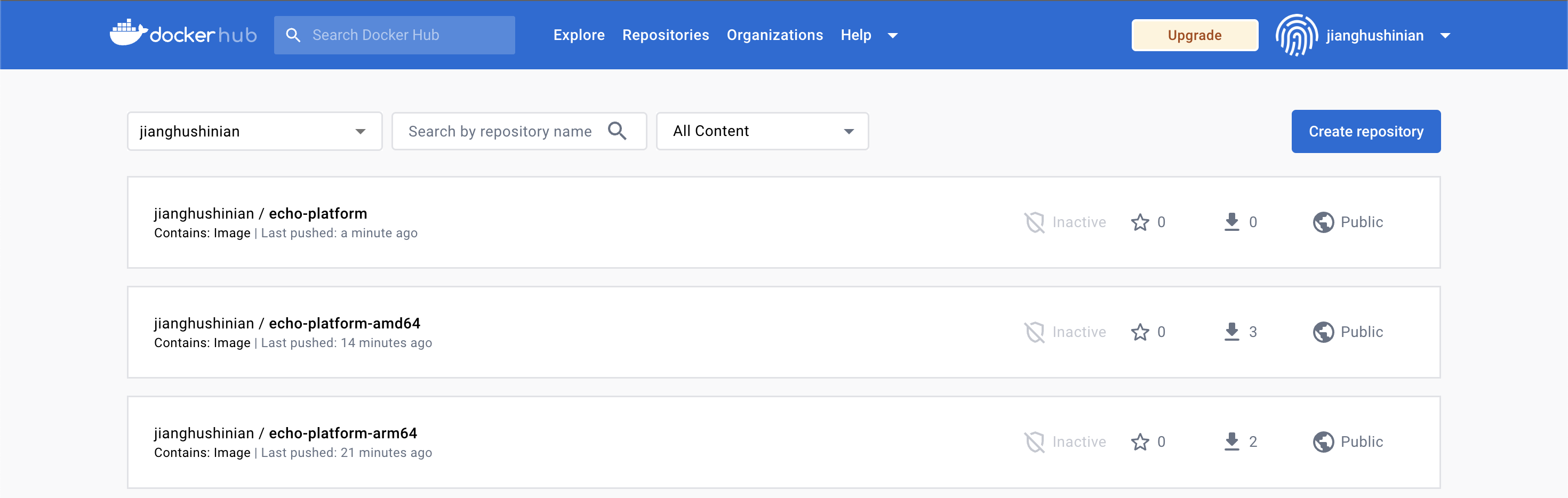
浏览器中登录 Docker Hub 查看推送成功的镜像:

echo-platform
echo-platform

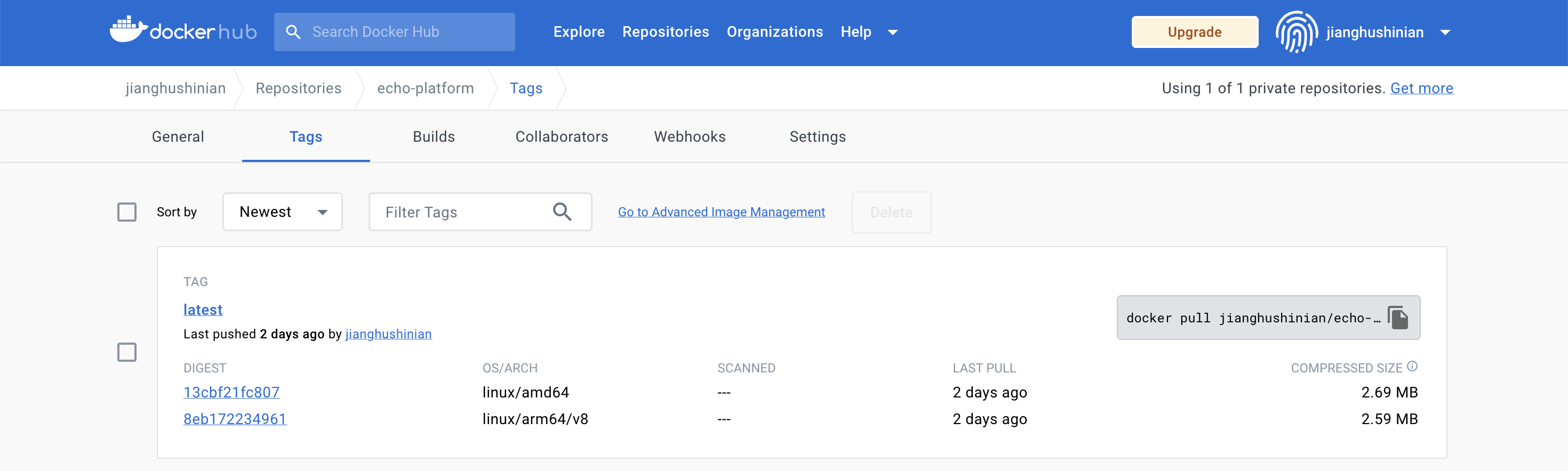
进入镜像信息详情页面的 Tags 标签,能够看到镜像支持 amd64、arm64/v8 这两个平台。

multi-arch
multi-arch

现在,我们可以在 amd64 架构的设备上同样使用 docker run 命令启动构建好的跨平台镜像 jianghushinian/echo-platform:

1
2
# docker run --rm jianghushinian/echo-platform
Linux buildkitsandbox 5.4.0-80-generic #90-Ubuntu SMP Fri Jul 9 22:49:44 UTC 2021 x86_64 Linux

输出结果没有任何问题。可以发现,无论是 arm64 设备还是 amd64 设备,虽然同样使用 docker run --rm jianghushinian/echo-platform 命令启动镜像,但它们的输出结果都表明启动的是当前平台的镜像,没有再次出现警告。

manifest 功能清单

docker manifest 不止有 create 一个子命令,可以通过 --help/-h 参数查看使用帮助:

1
2
3
4
5
6
7
8
9
10
11
12
13
14
15
16
17
18
19
20
21
22
23
24
25
26
27
28
29
$ docker manifest --help

Usage: docker manifest COMMAND

The **docker manifest** command has subcommands for managing image manifests and
manifest lists. A manifest list allows you to use one name to refer to the same image
built for multiple architectures.

To see help for a subcommand, use:

docker manifest CMD --help

For full details on using docker manifest lists, see the registry v2 specification.

EXPERIMENTAL:
docker manifest is an experimental feature.
Experimental features provide early access to product functionality. These
features may change between releases without warning, or can be removed from a
future release. Learn more about experimental features in our documentation:
https://docs.docker.com/go/experimental/

Commands:
annotate Add additional information to a local image manifest
create Create a local manifest list for annotating and pushing to a registry
inspect Display an image manifest, or manifest list
push Push a manifest list to a repository
rm Delete one or more manifest lists from local storage

Run 'docker manifest COMMAND --help' for more information on a command.

可以发现,docker manifest 共提供了 annotate、create、inspect、push、rm 这 5 个子命。

接下来我们分别看下这几个子命令的功能。

create

先从最熟悉的 create 子命令看起,来看下它都支持哪些功能。

1
2
3
4
5
6
7
8
9
10
11
12
13
14
15
16
17
$ docker manifest create -h
Flag shorthand -h has been deprecated, please use --help

Usage: docker manifest create MANIFEST_LIST MANIFEST [MANIFEST...]

Create a local manifest list for annotating and pushing to a registry

EXPERIMENTAL:
docker manifest create is an experimental feature.
Experimental features provide early access to product functionality. These
features may change between releases without warning, or can be removed from a
future release. Learn more about experimental features in our documentation:
https://docs.docker.com/go/experimental/
Options:
-a, --amend Amend an existing manifest list
--insecure Allow communication with an insecure registry

笔记:可以看到输出结果第一行的提示,短标志 -h 已经被弃用,推荐使用 --help 查看子命令帮助信息。

可以发现,create 子命令支持两个可选参数 -a/--amend 用来修订已存在的多架构镜像。

指定 --insecure 参数则允许使用不安全的(非 https)镜像仓库。

push

push 子命令我们也见过了,使用 push 可以将多架构镜像推送到镜像仓库。

来看下 push 还支持设置哪些可选参数。

1
2
3
4
5
6
7
8
9
10
11
12
13
14
15
16
17
$ docker manifest push -h
Flag shorthand -h has been deprecated, please use --help

Usage: docker manifest push [OPTIONS] MANIFEST_LIST

Push a manifest list to a repository

EXPERIMENTAL:
docker manifest push is an experimental feature.
Experimental features provide early access to product functionality. These
features may change between releases without warning, or can be removed from a
future release. Learn more about experimental features in our documentation:
https://docs.docker.com/go/experimental/
Options:
--insecure Allow push to an insecure registry
-p, --purge Remove the local manifest list after push

同样的,push 也有一个 --insecure 参数允许使用不安全的(非 https)镜像仓库。

-p/--purge 选项的作用是推送本地镜像到远程仓库后,删除本地 manifest list。

inspect

inspect 用来查看 manifest/manifest list 所包含的镜像信息。

其使用帮助如下:

1
2
3
4
5
6
7
8
9
10
11
12
13
14
15
16
17
$ docker manifest inspect -h
Flag shorthand -h has been deprecated, please use --help

Usage: docker manifest inspect [OPTIONS] [MANIFEST_LIST] MANIFEST

Display an image manifest, or manifest list

EXPERIMENTAL:
docker manifest inspect is an experimental feature.
Experimental features provide early access to product functionality. These
features may change between releases without warning, or can be removed from a
future release. Learn more about experimental features in our documentation:
https://docs.docker.com/go/experimental/
Options:
--insecure Allow communication with an insecure registry
-v, --verbose Output additional info including layers and platform

--insecure 参数允许使用不安全的(非 https)镜像仓库。这已经是我们第三次看见这个参数了,这也验证了 docker manifest 命令需要联网才能使用的说法,因为这些子命令基本都涉及到和远程镜像仓库的交互。

指定 -v/--verbose 参数可以输出更多信息,包括镜像的 layers 和 platform 信息。

使用示例如下:

1
2
3
4
5
6
7
8
9
10
11
12
13
14
15
16
17
18
19
20
21
22
23
24
25
26
$ docker manifest inspect jianghushinian/echo-platform
{
"schemaVersion": 2,
"mediaType": "application/vnd.docker.distribution.manifest.list.v2+json",
"manifests": [
{
"mediaType": "application/vnd.docker.distribution.manifest.v2+json",
"size": 735,
"digest": "sha256:13cbf21fc8078fb54444992faae9aafca0706a842dfb0ab4f3447a6f14fb1359",
"platform": {
"architecture": "amd64",
"os": "linux"
}
},
{
"mediaType": "application/vnd.docker.distribution.manifest.v2+json",
"size": 735,
"digest": "sha256:8eb172234961bf54a01e83d510697f09646c43c297a24f839be846414dfaf583",
"platform": {
"architecture": "arm64",
"os": "linux",
"variant": "v8"
}
}
]
}

从输出信息中可以发现,我们构建的多架构镜像 jianghushinian/echo-platform 包含两个 manifest,可以支持 amd64/arm64 架构,并且都为 linux 系统下的镜像。

指定 -v 参数输出更详细信息:

1
2
3
4
5
6
7
8
9
10
11
12
13
14
15
16
17
18
19
20
21
22
23
24
25
26
27
28
29
30
31
32
33
34
35
36
37
38
39
40
41
42
43
44
45
46
47
48
49
50
51
52
53
54
55
56
57
58
59
60
61
62
63
64
65
66
67
68
69
70
$ docker manifest inspect -v jianghushinian/echo-platform
[
{
"Ref": "docker.io/jianghushinian/echo-platform:latest@sha256:13cbf21fc8078fb54444992faae9aafca0706a842dfb0ab4f3447a6f14fb1359",
"Descriptor": {
"mediaType": "application/vnd.docker.distribution.manifest.v2+json",
"digest": "sha256:13cbf21fc8078fb54444992faae9aafca0706a842dfb0ab4f3447a6f14fb1359",
"size": 735,
"platform": {
"architecture": "amd64",
"os": "linux"
}
},
"SchemaV2Manifest": {
"schemaVersion": 2,
"mediaType": "application/vnd.docker.distribution.manifest.v2+json",
"config": {
"mediaType": "application/vnd.docker.container.image.v1+json",
"size": 1012,
"digest": "sha256:5c48af5176402727627cc18136d78f87f0793ccf61e3e3fb4df98391a69e9f70"
},
"layers": [
{
"mediaType": "application/vnd.docker.image.rootfs.diff.tar.gzip",
"size": 2818413,
"digest": "sha256:59bf1c3509f33515622619af21ed55bbe26d24913cedbca106468a5fb37a50c3"
},
{
"mediaType": "application/vnd.docker.image.rootfs.diff.tar.gzip",
"size": 211,
"digest": "sha256:1e5897976ad1d3969268a18f4f0356a05875baf0225e39768a9066f43e950ebd"
}
]
}
},
{
"Ref": "docker.io/jianghushinian/echo-platform:latest@sha256:8eb172234961bf54a01e83d510697f09646c43c297a24f839be846414dfaf583",
"Descriptor": {
"mediaType": "application/vnd.docker.distribution.manifest.v2+json",
"digest": "sha256:8eb172234961bf54a01e83d510697f09646c43c297a24f839be846414dfaf583",
"size": 735,
"platform": {
"architecture": "arm64",
"os": "linux",
"variant": "v8"
}
},
"SchemaV2Manifest": {
"schemaVersion": 2,
"mediaType": "application/vnd.docker.distribution.manifest.v2+json",
"config": {
"mediaType": "application/vnd.docker.container.image.v1+json",
"size": 1027,
"digest": "sha256:f017783a39920aa4646f87d7e5a2d67ab51aab479147d60e5372f8749c3742bb"
},
"layers": [
{
"mediaType": "application/vnd.docker.image.rootfs.diff.tar.gzip",
"size": 2715434,
"digest": "sha256:9b3977197b4f2147bdd31e1271f811319dcd5c2fc595f14e81f5351ab6275b99"
},
{
"mediaType": "application/vnd.docker.image.rootfs.diff.tar.gzip",
"size": 212,
"digest": "sha256:edf2b8e1db64e4f46a2190a3dfcb74ae131ae13ad43fcfedde4c3f304c451f7d"
}
]
}
}
]

annotate

annotate 子命令可以给一个本地镜像 manifest 添加附加的信息。这有点像 K8s Annotations 的意思。

其使用帮助如下:

1
2
3
4
5
6
7
8
9
10
11
12
13
14
15
16
17
18
19
20
$ docker manifest annotate -h
Flag shorthand -h has been deprecated, please use --help

Usage: docker manifest annotate [OPTIONS] MANIFEST_LIST MANIFEST

Add additional information to a local image manifest

EXPERIMENTAL:
docker manifest annotate is an experimental feature.
Experimental features provide early access to product functionality. These
features may change between releases without warning, or can be removed from a
future release. Learn more about experimental features in our documentation:
https://docs.docker.com/go/experimental/

Options:
--arch string Set architecture
--os string Set operating system
--os-features strings Set operating system feature
--os-version string Set operating system version
--variant string Set architecture variant

可选参数列表如下:

选项
描述
–arch 设置 CPU 架构信息。
–os 设置操作系统信息。
–os-features 设置操作系统功能信息。
–os-version 设置操作系统版本信息。
–variant 设置 CPU 架构的 variant 信息(翻译过来是“变种”的意思),如 ARM 架构的 v7、v8 等。

例如设置操作系统版本信息,可以使用如下命令:

1
$ docker manifest annotate --os-version macOS jianghushinian/echo-platform jianghushinian/echo-platform-arm64

现在使用 inspect 查看镜像信息已经发生变化:

1
2
3
4
5
6
7
8
9
10
11
12
13
14
15
16
17
18
19
20
21
22
23
24
25
26
{
"schemaVersion": 2,
"mediaType": "application/vnd.docker.distribution.manifest.list.v2+json",
"manifests": [
{
"mediaType": "application/vnd.docker.distribution.manifest.v2+json",
"size": 735,
"digest": "sha256:13cbf21fc8078fb54444992faae9aafca0706a842dfb0ab4f3447a6f14fb1359",
"platform": {
"architecture": "amd64",
"os": "linux"
}
},
{
"mediaType": "application/vnd.docker.distribution.manifest.v2+json",
"size": 735,
"digest": "sha256:8eb172234961bf54a01e83d510697f09646c43c297a24f839be846414dfaf583",
"platform": {
"architecture": "arm64",
"os": "linux",
"os.version": "macOS",
"variant": "v8"
}
}
]
}

rm

最后要介绍的子命令是 rm,使用 rm 可以删除本地一个或多个多架构镜像(manifest lists)。

1
2
3
4
5
6
7
8
9
10
11
12
13
$ docker manifest rm -h
Flag shorthand -h has been deprecated, please use --help

Usage: docker manifest rm MANIFEST_LIST [MANIFEST_LIST...]

Delete one or more manifest lists from local storage

EXPERIMENTAL:
docker manifest rm is an experimental feature.
Experimental features provide early access to product functionality. These
features may change between releases without warning, or can be removed from a
future release. Learn more about experimental features in our documentation:
https://docs.docker.com/go/experimental/

使用示例如下:

1
$ docker manifest rm jianghushinian/echo-platform

现在使用 inspect 查看镜像信息已经不在有 os.version 信息了,因为本地镜像 manifest lists 信息已经被删除,重新从远程镜像仓库拉下来的多架构镜像信息并不包含 os.version。

1
2
3
4
5
6
7
8
9
10
11
12
13
14
15
16
17
18
19
20
21
22
23
24
25
26
$ docker manifest inspect jianghushinian/echo-platform
{
"schemaVersion": 2,
"mediaType": "application/vnd.docker.distribution.manifest.list.v2+json",
"manifests": [
{
"mediaType": "application/vnd.docker.distribution.manifest.v2+json",
"size": 735,
"digest": "sha256:13cbf21fc8078fb54444992faae9aafca0706a842dfb0ab4f3447a6f14fb1359",
"platform": {
"architecture": "amd64",
"os": "linux"
}
},
{
"mediaType": "application/vnd.docker.distribution.manifest.v2+json",
"size": 735,
"digest": "sha256:8eb172234961bf54a01e83d510697f09646c43c297a24f839be846414dfaf583",
"platform": {
"architecture": "arm64",
"os": "linux",
"variant": "v8"
}
}
]
}

总结

本文主要介绍了如何使用 docker manifest 来实现构建跨平台镜像。

首先对 docker manifest 进行了简单介绍,它是 Docker 的一个子命令,本身并不执行任何操作,为了操作一个 manifest 或 manifest list,必须使用它包含的子命令。

接着我们又在 Apple M2 芯片设备上构建了不同平台的镜像,然后使用 manifest list 的能力将其合并成跨平台镜像。

最后对 docker manifest 支持的所有子命令都进行了讲解。

参考

docker manifest 官方文档:https://docs.docker.com/engine/reference/commandline/manifest/